2.1 System configuration using Biz / Browser
Biz / Browser is used by connecting to a WEB server via the Internet or an intranet . The system configuration at this time is no different from a normal WEB browser, it can be connected to most WEB servers, and the application environment on the server side does not need to be special.
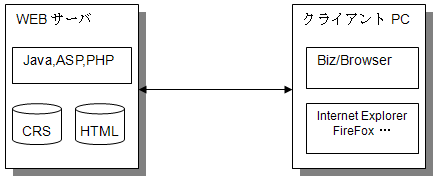
The only difference between a system using HTML and a web browser is that it works by downloading CRS from a web server instead of HTML .
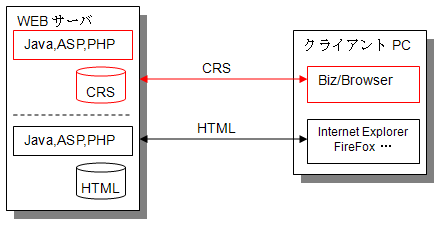
Like HTML , CRS files can be created with Biz / Designer and placed as files on the WEB server, or dynamically generated by server-side applications such as Java and ASP.
In addition to CRS files, you can also work with the following files:
CRX file
It is a script file like CRS , but the extension is CRX . Opening the URL of a CRX file in Internet Explorer differs from a CRS file in that the Biz / Browser window opens outside Internet Explorer.
Mobile & AI are not supported.
CRSEXT file
This is a script file that operates in the same way as CRX , but with the extension CRSEXT.
Added from Ver. 4.3.0.2
Mobile & AI are not supported.
CAR file (CRS Archive)
This is a compressed and stored file such as a CRS file and related image files. Communication efficiency is further improved because the related compressed files can be downloaded at one time. CAR files can be created with Biz / Designer (Mobile) or the dedicated tool car.exe.
Added from Mobile Ver. 4.0.0
Added from AI Ver. 1.0.1
JPEG , PNG files (BMP , GIF , TIFF , EXIF , transparent PNG files) Ver. 5.0.0 & AI
It supports JPEG format and PNG format image files. Biz / Browser V and later also support formats such as BMP , GIF , TIFF , and EXIF.
AI supports transparent PNG format as well as BMP and GIF format.
cur, ani file
This is a file for the mouse cursor.
Mobile & AI are not supported
Other files
In addition to the above, files of any format can be handled as data used by the application. Especially for XML files and CSV files, we have many convenient functions for processing on CRS scripts.