2.2 Linkage with server applications
Biz / Browser communicates with the WEB server via HTTP . Therefore, the application running on the WEB server side can receive the request from Biz / Browser and return the response in the same way as the communication with the normal WEB browser.
Example of VBScript running on IIS
In this example, “ Hello” is displayed in TextBox1 of Biz / Browser.
— CRS sample1.crs —
Form sample {
    Width = 300; <br>
    Height = 200;<br>
    TextBox TextBox1 {<br>
        X = 10;<br>
        Y = 10;<br>
        Width = 100;<br>
        Height = 30;<br>
    }
    Get ("sample1.asp");<br>
}
— VBScript – sample1.asp —
 <%
    Response.Write ("TextBox1.value =" + Chr (& h22) + "Hello" + Chr (& h22) + ";")
%>
In this way, the server-side programming method is no different from HTML . The only difference is that the response is a CRS script instead of HTML.
Example of sending data from Biz / Browser
In this example, the value entered in TextBox1 when Button1 of Biz / Browser is clicked is passed to the WEB server.
— CRS sample2.crs —
Form sample {
    Width = 300;
    Height = 200;
    TextBox TextBox1 {
        X = 10;
        Y = 10;
        Width = 100;
        Height = 30;
    }
    Button Button1 {
        X = 10;
        Y = 50;
        Width = 100;
        Height = 30;
        Title = "click";
        Function OnTouch (e) {
            Get ("sample2.asp", sample.TextBox1);
        }
    }
}
— VBScript – sample2.asp —
<%
    ' Get request parameters
    data = Request.Form ("TextBox1")
    Response.Write ("title =" + Chr (& h22) + data + Chr (& h22) + ";")
%>
In this way, receiving parameters is no different than in HTML.
Example of linkage between Biz / Browser and Servlet
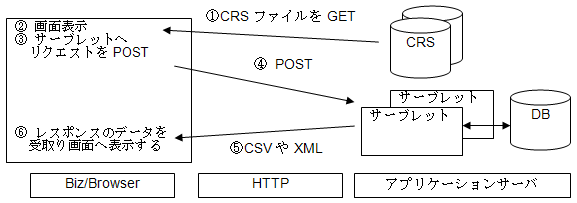
CRS script example from ③ to ⑥
::
Button MyButton {
    :
    Function OnTouch (e) {
        try {
            var session = getHttpSession ();
            var request = session.CreateRequest ("/ app / proc1");
            request.AddParam ("code", 123);
            var response = session.Post (request);
            var xmlImpl = new xmlDOMImplimentation;
            var xdoc = xmlImpl.Load (response);
            this.Title = xdoc.SelectSingleNode ("// name"). Text;
        }
        catch (exp) {
            MessageBox (exp);
        }
    }
::
}
::