2.3 Reminder when building a system
When building a business application with CRS , there are the following major differences compared to HTML.
Difference in communication unit
CRS files contain screen layout information, but unlike HTML , one CRS file does not always correspond to one screen.
The CRS file acquired by communicating with the WEB server is not displayed on the screen as it is like HTML , but is executed by Biz / Browser as a script. Depending on the content of the CRS script, the screen may be displayed as a result of execution , or just the data may be updated.
Therefore, it is possible to create multiple screen elements in Biz / Designer and combine them at runtime to form a single screen, or combine only the common logic parts into separate files.
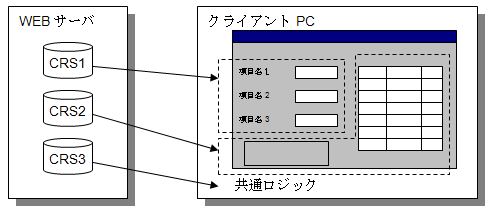
It is also possible to change only a part of the screen by downloading a CRS script that changes only a part of the displayed screen from the WEB server. For example, when changing the background color of TextBox1 to red, the WEB server will send the following CRS script.
TextBox1.BgColor = $RED;
Difference way of thinking of cache
The Biz / Browser cache is saved in a compiled binary format of the downloaded CRS script. As a result, cached CRS scripts can be called very quickly with no compilation overhead.
Also, unlike a normal WEB browser, the Biz / Browser cache is valid unless the cached contents are explicitly deleted. There is no communication to check if the cache contents are out of date. Cache integrity must be ensured by the application running on the web server.
As you can see, the Biz / Browser cache should be thought of as an “installation of CRS scripts” rather than a “cache” .
Key points for improving performance
In order to be able to use business applications comfortably with Biz / Browser , it is necessary to design the application so that it returns a quick response to the user’s operation.
Biz / Browser has various built-in functions to improve the response speed, but the most important thing is to reduce the number of communications with the WEB server as much as possible. Also, when communicating, please try to retrieve the necessary data in one communication as much as possible. Although it depends on the communication environment, in the case of a communication volume of several tens of K as handled by Biz / Browser , most of the processing time is occupied by connecting and disconnecting the connection.
Examples of poor performance
Get ("prog1? Code = 1");
Get ("prog2? Code = 1");
If there are two types of required data like this, it will take twice as long to acquire with two GET commands.
Examples to improve performance
Prepare prog3 that returns a response including the response contents of both prog1 and prog2 , and aggregate it into one-time communication.
Get ("prog3? Code = 1");
This will complete the communication in about half the time compared to the poor performance example.