2.6 Visual Style
Biz / Browser V or later supports the visual style adopted in Windows XP or later.
When the visual style is enabled, each display object is in line with the theme of the OS and the sense of unity with the OS is improved.
Not supported by AI
Apply / cancel visual style
The availability of visual styles is specified by the VisualStyle property of the DisplayObject-derived class. You can specify whether to apply visual styles to each object individually. However, the specification of the VisualStyle property of a class that does not support visual style is invalid (no change).
The exception is that the root object’s VisualStyle property specifies the default state. If you want to display in the traditional classic style without applying the visual style, if you specify root.VisualStyle = $ FALSE, the VisualStyle specification of each object will be invalid and all will be displayed in the classic style.
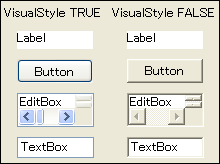
Restrictions when applying visual style
When the visual style is enabled, the affinity with the OS theme is prioritized, so there are restrictions on color specification, style specification, etc. The following shows the classes that have restrictions when specifying the visual style.When the visual style is enabled, the affinity with the OS theme is prioritized, so there are restrictions on color specification, style specification, etc.
The following shows the classes that have restrictions when specifying the visual style.
| Package | Class | Explanation |
|---|---|---|
| Standard | CheckBox | The FgColor property is disabled and follows the OS theme |
| Dialog | Specifying a visual style is invalid | |
| Doc | Specifying a visual style is invalid | |
| Graph | Specifying a visual style is invalid | |
| Label | Specifying a visual style is invalid | |
| OptionButton | The FgColor property is disabled and follows the OS theme | |
| PulldownList | BgColor is disabled on Windows Vista and later OS due to OS restrictions . | |
| Root | Specifying a visual style is invalid | |
| Spread | LabelBgColor property and NumberBgColor property are invalid because they give priority to the theme background. | |
| Extension3 | SVGButton | Specifying a visual style is invalid |
| TabFrame | TabPosition can only be used for $ STD due to OS restrictions BgColor is disabled because it gives priority to theme display | |
| Extension4 | FlexView | FlexItem.TitleBgColor is disabled because it gives priority to theme display FlexButton.BgColor is disabled because it gives priority to theme display |
| GroupBox | Specifying a visual style is invalid | |
| ImageButton | Specifying a visual style is invalid | |
| ImageLabel | Specifying a visual style is invalid | |
| ProgressBar | BarColor and BgColor properties are disabled because they give priority to theme display | |
| StyleEdit | Specifying a visual style is invalid | |
| Extension5 | HtmlView | Specifying a visual style is invalid |
| PrintStream | PreviewForm | Specifying a visual style is invalid |
The effects of Common Control
A common control is a library of controls such as tab controls and tree views added to basic controls such as buttons and text boxes installed in Windows. It is included as comctl32.dll on all Windows 95 and later versions. The common control has been updated with Internet Explorer, and the conventional Biz / Browser has used the common control Ver.5.
Biz / Browser V or later has been changed to use Common Control Ver.6 introduced in Windows XP or later OS. By using this common control Ver.6, it is possible to correspond to the visual style. Common Control Ver.6 itself is equipped with a classic style display compatible with conventional Windows (Windows Classic Theme). However, even if it is displayed in the classic style, minor corrections have been made from Ver.5, and it has been found that display differences occur on a pixel-by-pixel basis.
Biz / Browser is also affected by this, and even if the visual style is disabled, the display will not be exactly the same in pixel units before XE and after V when running on Windows XP or later OS. If you run an application created before Biz / Browser V on Biz / Browser V on Windows XP or later, you need to consider that the displays will not match exactly.