3.10 Formula and Operators
Formula
Objects can manage data, but formulas can be used as data values. When the calculation formula is used, the calculation result is the value of the object. Since the calculation formula is completed and operates within the client, it operates at high speed without the need for overhead such as network communication. When a good response is required for the user’s interactive operation, it is often not possible to obtain sufficient responsiveness by using the method of requesting processing to the server, but even in such a situation as much as possible. It is a good idea to consider whether you can use event handlers and the formulas described here so that they are completed within the client. In particular, for simple value derivation that does not require server-side resources (database, etc.), quick response can be obtained by using an expression, and no load is generated on the server or network.
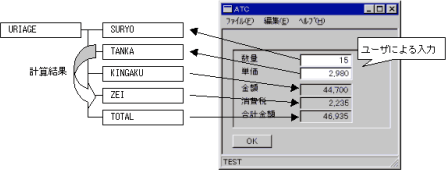
In the following example, the amount and sales tax are displayed using an expression rather than the quantity and unit price entered by the user.
Example
URIAGE.KINGAKU & = URIAGE.SURYO * URIAGE.TANKA;
URIAGE.ZEI & = URIAGE.KINGAKU * 0.05;
URIAGE.TOTAL & = URIAGE.KINGAKU + URIAGE.ZEI;
*: Multiplying operator
+: Operator to add
& =: Operator to indicate a reference
If the above example is related to DisplayObject , KINGAKU , ZEI, TOTAL will be calculated by inputting SURYO or TANKA from the screen, and the calculation result will be displayed on the screen. This operation does not cause data communication and good responsiveness can be obtained.
In addition, the following operators can be used.
| Priority | Types | Symbol | Evaluation order |
|---|---|---|---|
| High | new operator | new | Left → right |
| Member reference operator | . ( Period ) | Left → right | |
| Array operator | [ And ] | Left → right | |
| Parenthesis operator | () | Left → right | |
| Left addition, left subtraction | ++, - | Left → right | |
| Right addition, right subtraction | ++, - | Left → right | |
| Unary operator | -, +,! | Left → right | |
| Arithmetic operator | * , /,% | Left → right | |
| Arithmetic operator | +,- | Left → right | |
| Relational operator | >,> =, <, <= | Left → right | |
| Equivalence operator | ==,! =, = = &,! = & | Left → right | |
| Logical join operator | &, &&, |, || | Left → right | |
| Ternary operator | ?,: | Right → left | |
| Assignment operator | + =,-=, * =, / =,% = | Right → left | |
| Assignment operator | =, & =, « | Right → left | |
| Low | Comma operator | ,, | Left → right |
1.New Operator
Format
new object type [”(“ [ parameter 1 [, parameter 2 [, …]]] “)”]
Description
The new operator creates a new object of the type specified by the object type.
The parameters are constructor parameters that vary depending on the type of object. Objects that can be created by the new operator are limited to objects that do not have controls displayed on the screen.
The object created by the new operator is not connected to the object tree starting with // . It is automatically deleted when it goes out of scope.
If you want to keep the object created by new out of scope, connect it to the tree with the Append method.
Example
var a = new String ("sample");
2. Addition / subtraction operator
Format
| Object [ .property ] ++ | Left addition |
| Object [ .property ] - - | Left subtraction |
| ++Object [ .property ] | Right addition |
| - -Object [ .property ] | Right subtraction |
Description
The left addition operator evaluates the value on the left side and then adds 1 to the property on the left side.
The left subtraction operator evaluates the value on the left side and then subtracts 1 from the property on the left side .
The right addition operator adds 1 to the property on the right side and uses that value as the evaluation value.
The right subtraction operator subtracts 1 from the property on the right side and uses that value as the evaluation value.
var a = 10;
print("a  ", a, "\n");
print("a++", a++, "\n");
print("a  ", a, "\n");
print("a--", a--, "\n");
print("a  ", a, "\n");
print("++a", ++a, "\n");
print("a  ", a, "\n");
print("--a", --a, "\n");
print("a  ", a, "\n");
Execute Result
a   10
a++ 10
a   11
a-- 11
a   10
++a 11
a   11
--a 10
a   10
3. Parenthesis operator
Description
The parenthesis operator is used to explicitly specify the order of operations. () Is always used in pairs, and expressions in parentheses are evaluated in preference to those outside the parentheses when evaluating expressions.
An example using the parentheses operator is shown below.
Example of using the parenthesis operator
URIAGE.KINGAKU = (URIAGE.TANKA + URIAGE.COST) * URIAGE.SURYO
In this example, the addition of TANKA + COST is prioritized over the multiplication of SURYO.
4. Unary operator
Description
| -Object [ .property ] | minus sign operator |
| + Object [ .property ] | plus sign operator |
| ! Object [ .property ] | logical negation operator |
The minus sign operator re-evaluates the evaluation value on the right-hand side as a number and inverts the sign.
The plus sign operator is included as a pair of minus sign operators, but it has no meaningful behavior.
The logical negation operator re-evaluates the evaluation value on the right-hand side as a Boolean value and inverts the result.
Example of unary operator
var a = 100;
var b = -100;
var c = 0;
print ("a", a, "\ n");
print ("b", b, "\ n");
print ("c", c, "\ n");
print ("-a", -a, "\ n");
print ("-b", -b, "\ n");
print ("+ a", + a, "\ n");
print ("+ b", + b, "\ n");
print ("! a",! a, "\ n");
print ("! b",! b, "\ n");
print ("! c",! c, "\ n");
Execute Result
a 100
b -100
c 0
-a -100
-b 100
+ a 100
+ b -100
! a 0
! b 0
! c 1
5. Arithmetic operator
Description
Arithmetic operators define the operations that apply between two expressions. The order of priority when evaluating an expression is *, /,%, +,- .
Example of using arithmetic operators
URIAGE.TANKA * 1.05
6. Relational operator
Format
Equation 1 > Equation 2
Equation 1 > = Equation 2
Equation 1 < Equation 2
Equation 1 <= Equation 2
Description
The relational operator returns the result of comparing the magnitude relation between the lvalue and the rvalue as True or False . The conditions of comparison can be classified as follows according to the type of the formula of the comparison control.
| String | Compare the magnitude of the code value from the beginning of the character data |
| Number | Compare the magnitude of the value |
| Date | Compare date and time |
If the types of the left side and the right side are different, the type conversion is performed and compared as follows.
| Left side type | Right-hand side type | explanation |
|---|---|---|
| String | Number | Convert the String on the left side to Number |
| String | Date | Convert the String on the left side to Date |
| Number | Date | Convert Date on the right side to Number |
| null | String | Always false |
| null | Number | Always false |
| null | Date | Always false |
| object | ―――― | Perform the above conversion using the default properties of the object on the left side |
If the types of the left and right sides are the opposite of those in the above table, they will be converted in the same way.
Example of relational operator
Evaluated as 1200 <1000 False
Evaluated as “abc” <”def” True
URIAGE.TANKA = 100;
Evaluated as URIAGE.TANKA <200 True
7. Equivalence operator
Format
Equation 1 == Equation 2
Equation 1 ! = Equation 2
Equation 1 = = & Equation 2
Equation 1 ! = & Equation 2
Description
Equivalent operators are equivalent to relational operators except that they have lower precedence. The conditions for comparison also follow this.
== is true if expression 1 and expression 2 are equal
! = Is true if Equation 1 and Equation 2 are not equal
= = & Is true if expression 1 and expression 2 point to instances of the same object
! = & Is true if expression 1 and expression 2 do not point to an instance of the same object
If the types of the left side and the right side are different, the type conversion is performed and compared as follows.
| Left side type | Right-hand side type | Explanation |
|---|---|---|
| String | Number | Convert the String on the left side to Number |
| String | Date | Convert the String on the left side to Date |
| Number | Date | Convert Date on the right side to Number |
| null | String | Always false |
| null | Number | Always false |
| null | Date | Always false |
| null | null | Always true |
| Object | Non -null | Perform the above conversion using the default properties of the objects on the left side ( most objects are value properties ) |
| Object | null | If the object entity on the left side does not exist , it is equal to null , and if an entity exists, it is not equal to null . |
If the types of the left and right sides are the opposite of those in the above table, they will be converted in the same way.
Example of equality operator
URIAGE.KINGAKU = 1000;
URIAGE.KINGAKU == 1000; / * Evaluated as true * /
URIAGE.KINGAKU = = & //. SALES.URIAGE.KINGAKU; / * Evaluated as true * /
“” == null; / * Evaluated as false * /
“”! = null; / * Evaluated as true * /
String str1 = “”;
str1 == null; / * Evaluated as false * /
str1! = null; / * Evaluated as true * /
var v1;
v1 == null; / * Evaluated as true * /
v1 = str1;
v1 == null; / * Evaluated as false * /
v1 = str2; / * Reference for non-existent objects * /
v1 == null; / * Evaluated as false * /
8. Logical join operator
Format
Equation 1 & Equation 2
Equation 1 && Equation 2
Equation 1 || Equation 2
Equation 1 ! = & Equation 2
& And && have the same meaning
| And || have the same meaning
Description
The logical join operator evaluates expression 1 and expression 2 as Boolean values and the result by logical AND (operator & or && ) and logical OR (operator | or || ).
Logical AND evaluates both left-hand and right-hand expressions and returns true only if both are true .
Logical OR evaluates left-hand and right-hand expressions and returns true if either is true . Otherwise, both return false .
(1 == 1) & (2 <3) Evaluated as true
(1 == 1) & (2> 3) Evaluated as false
(1 == 1) | (2> 3) Evaluated as true
9. Ternary operator
Format
Equation 1 ? Equation 2 : Equation 3
Description
If the evaluation result of Equation 1 is TRUE , Equation 2 is evaluated, and if it is FALSE , Equation 3 is evaluated.
Example of ternary operator
TextBox0.BgColor = R.Error == 0? $ STD: $ RED;
In this example, if the value of R.Error is 0 , the background of TextBox0 will be the standard color, otherwise it will be red.
10. Assignment operator
Format
Object [ .property ] = expression ;
Object [ .property ] + = expression ;
Object [ .property ]-= expression ;
Object [ .property ] * = expression ;
Object [ .property ] / = expression ;
Object [ .property ]% = expression ;
Object « expression ;
Object [ .property ] & = expression ;
Description
The = operator assigns the evaluation result of the expression to the object on the left side.
| The + = operator adds the evaluation result of the expression to the evaluation value on the left side and assigns it to the object on the left side. |
| The- = operator subtracts the evaluation result of the expression from the evaluation value on the left side and assigns it to the object on the left side. |
| The * = operator multiplies the evaluation result of the expression by the evaluation value on the left side and assigns it to the object on the left side. |
| The / = operator divides the evaluation value on the left side of the evaluation result of the expression and assigns it to the object on the left side. |
| The % = operator assigns the remainder of the evaluation value on the left side to the object on the left side in the evaluation result of the expression. |
The « operator behaves differently depending on the type of the object on the left side and the type of the expression on the right side. Normally, the behavior is like inserting the value on the right side into the object on the left side. A typical « operator is the insertion of CSV constants defined by the CSVDocument object.
Record r1[] {
    Number a;
    Number b;
    Number c;
}
r1 << csv {
1,2,3
4,5,6
7,8,9
1,2,3
};
In this example, we are inserting CSV constants into an arrayed Record object.
The & = operator is a type of assignment operator called the reference operator, which is used to define dynamic data references between objects. When you make an assignment with the reference operator, the recalculation is automatically performed when the evaluation result of the expression changes.
Number left = 100;
Label lbl001;
Label lbl002;
lbl001.Value &= left;
lbl002.Value = left;
......
left = 900;
In the initial state, 100 is displayed for both labels Lbl001 and Lbl002 on the screen, but when left changes to 900 , only Lbl001 is displayed as 900 , and Lbl002 does not change. That is, Lbl001 always refers to left by using the reference operator in the assignment expression, and the change is automatically reflected. On the other hand, Lbl002 stores the evaluation value of left at the time of assignment, and it is not reflected even if left changes.
Circular recalculation
The order in which the calculations are performed is automatically optimized to the most efficient order. Therefore, the order of recalculation may change depending on the situation, and the description should not be dependent on the calculation order.
Depending on the description of the reference expression, recursive recalculation can lead to an infinite loop. For example, in the following formula, the recalculation does not end forever.
      A & = B + 1;
      B & = A + 1;
This situation is detected when the recalculation is performed. Be careful when using it in event handlers or ternary operators as it is not detected by expression parsing. If detected as an anomalous expression, execution is interrupted and a CRS-354 exception is thrown before the value is evaluated .
Reference operator constraints
An expression that satisfies the following conditions can be written on the right side of the reference operator.
1. Do not involve update operation.
Throws a CRS-159 exception when the interpreter detects an update behavior . Update operations include ++ and –operators , methods that involve modifying, creating, and deleting objects, and calling functions. For example, the following description will result in an error.
A & = B ++;
Also, calling a user-defined function involves the creation of an internal object because the interpreter allocates a stack frame separate from the caller. Therefore, a user-defined function cannot be called by writing it on the right-hand side of the reference expression.
2. Must be connected to an object tree starting with // or placed in the global namespace.
You cannot use var variables or objects created with new that are not connected to the object tree.
3. Have a name
Object created by new or an object-specific method ( such as the File object returned by the [FileSystem.open () method )]’), or an event object passed to an event handler, an unnamed object that does not have a unique name cannot be described on the right-hand side.
Objects or properties that meet the following conditions can be specified on the left side of the reference operator. You cannot specify a var variable or any other element.
1. Must be connected to the object tree starting with //
Objects that are not connected to the object tree, such as var variables, objects located in the global namespace, or new, cannot be used.
2. Have a name
Anonymous objects that do not have a unique name, such as new, an object created by an object-specific method, or an event object passed to an event handler, cannot be written on the left side.
The recalculation is executed under the following conditions.
1. All objects or properties referenced on the right-hand side are actually accessible.
If the expression contains inaccessible properties, the CRS interpreter will not be able to validate the expression’s dependencies. In such cases, no successful recalculation will be performed.
Be especially careful when recalculating using the index property in an arrayed object
ListBox L1 {
    ListItem item1 [3];
}
ListBox L2 {
    ListItem item2 [3] {
        Selected & = F.L1.item1 [index] .Selected;   … [1]
    }
}
This example tries to match the selection position of L2 ‘s ListBox with the selection position of L1 . However, in the case of such a description, the index property, which is a property unique to array elements, cannot be accessed in the scope of [1]. Therefore, in this expression, the CRS interpreter cannot detect the dependency on the L1.item1 [n] .selected property and the recalculation is not performed even if the selected position of L1 changes.
In order to perform the recalculation correctly, you need to be able to access the property you are always referencing as follows:
ListBox L1 {
    ListItem item1 [3];
}
ListBox L2 {
    ListItem item2 [3] {
        Selected & = index! = null? F.L1.item1 [index] .Selected: F.L1.item1.Selected;
    }
}
Note : The index property, which does not specify the position of the array element, is affected by the ChangeProfile function to maintain compatibility with previous versions . See the global function ChangeProfile for more information.
2. The object or property that is directly referenced on the right side is updated.
Properties may be accessible by the unique methods provided by the object. For example, the Spread object’s GetCell () method returns the value property of a SpreadColumn object that sits below SpreadRow .
The CRS interpreter does not detect any indirect access to such properties. Therefore, the following example does not perform a recalculation.
Label Lab1 {
    :
    Value &= F.Spread1.GetCell(0,0);
    /* Value &= F.Spread1.SpreadRow[0].C1 と同じ値を得ます */
}
Spread Spread1 {
    :
    SpreadRow SpreadRow[4] {
        :
        SpreadColumn c1;
        SpreadColumn c2;
    }
}
:

Spread1.SetCell(0,0,"set data");
If you write a commented-out expression instead of a GetCell expression, the recalculation will be performed because you are directly describing the property you are actually accessing.
3. The recalculation of the arrayed objects is performed in ascending order of the array elements.
The recalculation order of array elements always starts with the younger element.
Canceling the reference operator
The automatic calculation by the recalculation formula is canceled by deleting the object to be calculated, deleting the object that is the base point of the recalculation formula, or assigning another value.
A & = B + 1;    [1]
   ::
B = 5;         [2]
A = 20;        [3]
B = 6;         [4]
In this example, recalculation is specified for A in [1], so if 5 is assigned to B in [2], A will automatically become 6 . Next , since 20 is assigned to A in [3], the automatic recalculation for A is canceled at this point. Therefore , even if B is updated in [4], A remains 20 .
Form F1 {
    TextBox T1 {
        ::
    }
    Label L1;
    Label L2 {
        ::
        F1.T1.Value & = F1.L1.Value * 2;
        Function OnClick (e) {
            Delete ();
        }
    }
}
In this example, the value of T1.Value is automatically recalculated with L1.Value * 2 , but clicking on L2 removes L2 . In this case, the T1.Value recalculation formula must be executed with the L2 object as the origin (this) , whereas the L2 object no longer exists, so the automatic recalculation of T1.Value is also cancelled.