3.4 Class
What is Class?
Classes define the nature and behavior of objects. The parts that make up the screen (buttons, windows, etc.), the characters to be printed, and the elements of the data to be processed are all represented by classes. Classes define properties, methods, events, and constants.
The object is an instance of the class. You can specify the behavior of an object by manipulating the methods and properties defined by the class with a CRS script.
Property
A property is an attribute of an object that is represented by a set of property name and property value, and is an element that determines the property of the object by the value of the property. By changing the value of the property, the appearance of the object and the reaction to the user’s operation change. The state of change depends on which property you have changed.
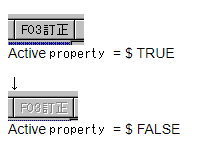
There are many types of properties depending on the class of the object. In addition, access control is performed for each property, and some can be changed dynamically, some are read-only, and some can be specified only at the time of creation.
Method
A Method is a kind of function. Objects behave according to the method being executed.
Method call example
Form1.DeleteChild ();         / * Deletes the contents of Form1. * / /
Form1.Get ("/mainmenu.crs"); / * Load mainmenu.crs into Form1 * /
Event
An event is raised when an object reacts to something. The type of event and the trigger for it to occur are defined by the class. For example, in the Button class, clicking a button raises a Touch event. Events can be captured by a Function ( called an event handler ) with the name “On” + event name, and an Event object is passed as a parameter. In the event handler, you can describe the processing according to the event.
:
Button btn {
    X = 10;
    Y = 10;
    Width = 120;
    Height = 30;
    Function OnTouch(e) {
        Title = "Clicked!";
    }
}
Operators that operate the class
instanceof and super are provided as operators for performing operations related to the class. instanceof is used to check if an object is an instance of a class.
:
if (object1 instanceof TextBox) {
    MessageBox("object1はTextBoxです");
}
:
In this example, a message box is displayed if object1 is a TextBox object or an object of a class defined based on the TextBox. Please note that the class judgment of instanceof is made by considering the derivation relationship. All CRS classes are derived from the Object class, so object1 instanceof Object is always true if object1 points to any object.
The super operator is an operator that can only be used within a Function. It is possible to call the method of the derivation source class by super.
class ClassA extends String {
    Function ToString() {
        return "ClassA : " + super ToString();
    }
}
class ClassB extends ClassA {
    Function ToString() {
        return "ClassB : " + super ToString();
    }
}
var A = new ClassA;
var B = new ClassB;
A.Value = "test";
B.Value = "test";
print(A.ToString(), "\n");
print(B.ToString(), "\n");
The result
ClassA : test
ClassB : ClassA : test
In this example, the call to B.toString () executes the toString () defined in ClassB , and super calls toString () in ClassA . ClassA ‘s toString ( ) also executes super toString () , so String ‘s toString () is called.
Also, super can be called in function form without specifying a specific Function name. If you call it like a function from within the constructor Function , the constructor of the derived class will be called. When called from within a normal Function , the Function with the same name in the derivation source class is called.
class MyClassA extends String {
    Function MyClassA(arg) {    ... (A)
     :
    }
}
class MyClassB extends MyClassA {
    Function MyClassB(arg) {
        super(arg);    ... (B)
        :
    }
}
In this example, the constructor of MyClassB is called from the constructor of MyClassB.
Class definition
Based on the class built into Biz / Browser , another class can be newly defined ( called a derivation ) in the CRS program . The newly defined class inherits the characteristics of the underlying class, but you can define new characteristics or change the original characteristics.
 :
class CustCode extends TextBox {
    Width = 120;
    Height = 24;
    MaxLength = 12;
    FontSize = 12;
    FontKind = $BOLD;
    Function OnGetFocus(e) {
        BgColor = $YELLOW;
    }
    Function OnLostFocus(e) {
        BgColor = $STD;
    }
}
In this example, the CustCode class is defined based on the TextBox . As a behavior specific to the CustCode class, you can realize a TextBox that turns yellow when it receives focus and returns to its original state when it loses focus.
When creating an application screen, it is better to define a class corresponding to the input item and place the object on the screen, rather than defining the input field individually for each screen, to improve development efficiency and maintainability.
Usage example of CustCode class
 :
Form form1 {
    :
    CustCode cd1 {
        X = 10;
        Y = 10;
    }
    :
}
 :
Functions written in the class definition behave like methods. Functions defined in a class are managed in units of the defined class.
For example, if function F is defined in both class B derived from class A, function F of class A and function F of class B coexist as different things. Calling such a function defined by the same name from an object executes the function of the highest defined class in the class hierarchy.
class ClassA extends String {
    Function FunctionF() {
        return "ClassA : " + Value;
    }
}
class ClassB extends ClassA {
    Function FunctionF() {
        return "ClassB : " + Value;
    }
}
var A = new ClassA;
var B = new ClassB;
A.Value = "test";
B.Value = "test";
print(A.FunctionF(), "\n");
print(B.FunctionF(), "\n");
The result
ClassA : test
ClassB : test
The behavior at which the top-level function is called in this way is determined solely by the object’s class hierarchy, regardless of the position of the calling script.
class ClassA extends String {
    Function PrintFunc(text) {    ... (A)
        print("ClassA.PrintFunc : ", text, "\n");
    }
    Function FunctionA() {    ... (B)
        PrintFunc("ClassA : " + value);
    }
}
class ClassB extends ClassA {
    Function PrintFunc(text) {    ... (C)
        print("ClassB.PrintFunc : ", text, "\n");
    }
    Function FunctionB() {    ... (D)
        PrintFunc("ClassB : " + value);
    }
}
var C = new ClassB("test");
C.FunctionA();    ... (X)
C.FunctionB();    ... (Y)
The result
ClassB.PrintFunc: ClassA: test
ClassB.PrintFunc: ClassB: test
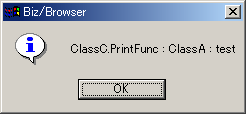
In this example, calling Function A in (X) executes the functions ( B ) and ( C ). The call to FunctionB in (Y) executes the functions in ( D ) and ( C ) . It works like replacing ClassA ‘s PrintFunc with ClassB , which is a derivative of ClassA . You can also give it another behavior by deriving ClassB , defining ClassC , and redefining PrintFunc as follows :
class ClassC extends ClassB {
    Function PrintFunc(text) {
        //.MessageBox("ClassC.PrintFunc : " + text);
    }
}
var C = new ClassC("test");
C.FunctionA();
The result
Constructor
Every class has a method called a constructor, which has the same name as the class name and is dedicated to initialization. The constructor is automatically called when the class is instantiated.
What the constructor does and what arguments it takes depends on the class. For example, if you pass a string to the constructor of the String class, that string will initialize the String object.
var v = new String("test");
print(v, "\n");
The result
test
You cannot call the constructor in any context other than object initialization. For example, the following script will result in an error.
var v = new String();
v.String("test");
print(v, "\n");
When defining a class, the constructor is defined like a normal function, but the function name is the same as the class name.
Constructor definition example
class MyString extends String {
    Function MyString(text) {
        super(text);
        value = ">>" + Value + "<<";
    }
}
If you do not define a constructor, it behaves as if the same constructor as the one in the source class was defined.
class MyString extends String {
    Function MyString(text) {    ... (A)
        super(text);
        value = ">>" + Value + "<<";
    }
}
class MyString2 extends MyString {
     :
    (コンストラクタ ファンクション未定義)
     :
}
 :

var c = new MyString2("test");    ... (B)
In this example, the constructor called by new in ( B ) is (A) .
Constructor arguments can be specified by creating an object with the new operator and calling the constructor of the derived class with the super () statement.
var v = new MyString("hello");
Whenever a constructor is called, the constructor of the source class must be called with the super () statement.
class MyString extends String {
    Function MyString(text) {
        super(text);
        value = ">>" + Value + "<<";
    }
}
Normally, try to execute super () at the beginning of the constructor. If the constructor does not contain a super statement, the process of calling super with no arguments is automatically inserted at the beginning.
If the constructor containing the super statement returns without calling the derived constructor due to an exception or control statement, the object generation is interrupted, the object being initialized is discarded, and the exception is thrown.
Behavior when creating an instance
Note that CRS scripts with normal variable scope and script execution triggers in package and class definitions are different.
01: package Package1 {
02:    Number Pdata1 = 10;
03:    String Pdata2 = "sample " + str(Pdata1);
04:    class MyClass extends String {
05:        MyData Cdata1 = Package1.Pdata1;
06:        String Cdata2 = "sample " + str(Cdata1);
07:        Function MyClass(t, d1, d2) {
08:            super(t);
09:            Cdata1 = d1;
10:            Cdata2 = d2;
11:        }
12:        Function FunctionA() {
13:            print(value, Package1.Pdata1, Cdata1, Cdata2, "\n");
14:        }
15:    }
16:    class MyClass2 extends MyClass {
17:        Number Cdata3 = 20;
18:        Function MyClass2(t) {
19:            super(t, 20, "hello");
20:        }
21:    }
22: }
If you import such a package, it works as follows:
Object definition part in the package ( 2nd to 3rd lines)
Runs when the package loads. The variable scope of this part is Package1 . Therefore, Pdata1 can be used to set the default value of Pdata2 .
Class definition part (4th to 22nd lines )
When the package is loaded, it is compiled and the class name is registered. No execution is done. Note that any grammatical errors in the class definition will be detected at load time, but run-time errors such as missing objects to update will not be detected until the time MyClass is instantiated.
Line 5 uses an undefined class called MyDate , but the validity of the class is not checked at compile time, so if the MyData class is defined by the time the first instance of MyClass is created, no error will occur. ..
The variable scope of this part is an instance of the class. Therefore, be aware that the scope associated with the object tree will change depending on the instantiation situation. The 13th line expects the reference to Pdata1 defined in the 2nd line , but which object is actually referred to is undefined depending on the run-time situation.
/ * Impact of an object with the same name as the package name 2 * /
String Package1 {
    String Pdata1 = "ABC";
    MyClass C;
}
:
Package1.C.FunctionA ();
In this case, this while executing FunctionA will be Package1.C , and if you refer to Package1 from within FuntionA , Package1 of String will be referenced instead of Package1 of the package name . As a result, Pdata1 refers to Pdata1 in the String instead of the Number object defined in the second line .
Also, in the following cases
/ * Impact of an object with the same name as the package name 2 * /
String foo {
    MyClass C {
        String Package1;
    }
}
:
foo.C.FunctionA ();
Package1 directly under C , which is the origin of the variable scope, is preferentially searched according to the search rule, so foo.C.Package1.Pdata1 in String is referenced , but it is undefined.
In this way, when referencing an object outside the class from within the class definition, it is especially important to note that the scope origin is an instance. Due to the specification that the search of child objects and ancestor objects is prioritized over the package name, there is no reliable way to refer to Package1.Pdata1 from MyClass.FunctionA as expected in this example.
When creating an instance of MyClass2 , the class defined in the package, it is executed as follows.
- The part described inline in the brace of the class is executed in the order of derivation source to derivation destination (String → MyClass → MyClass2) .
Line 5 :         MyNumber object is created and initialized to 10

Line 6 :         A String object is created and initialized to "Sample 10"

Line 7 :         The constructor for MyClass is defined. It has not been run yet.

Line 12 :        Function A is defined.

Line 17 :        A number object is created and initialized to 20 .

Line 18 :        The constructor for MyClass2 is defined. It has not been run yet.
- The constructor is searched in the order of derivation source (MyClass2 → MyClass → String) from the derivation destination , and the first found constructor is called.
Line 18 : The constructor for MyClass2 is executed.

Line 7 : The super () on line 19 executes the constructor for MyClass .

--- : The constructor of String is executed by super () on the 8th line .
After that, it returns in the order of the call sequence.
Points to keep in mind in class definition
Class name
The class definition must always be defined in the package. You cannot define a class that does not belong to a package.
The class name must be unique for all classes loaded into Biz / Browser . Current CRS does not allow duplicate class names for different packages. Also, it does not support class name qualification by package name, so be careful not to duplicate the class name.
Also, once the class is loaded into Biz / Browser , it will not be released until the session is disconnected. From this point as well, please be careful not to cause duplication or batting with the object name when naming the class name due to coding conventions.
Derivative relationship
A class must always be defined as a derivative based on an existing class. You can’t define a whole new class with no base class. It is possible to define a new class by further deriving the class defined by CRS , but the underlying class must be defined before the definition position of the new class.
Script-defined class constraints Today’s CRS has many restrictions on class definitions. Many of the constraints are due to differences in the behavior of built-in classes and script-defined classes. When using classes, you need to design with these constraints in mind.
The newly defined class cannot be used as an array. If you need to use it as an array, make sure to store it in an Array object. This constraint does not actually work if you define a new class by deriving a class that is forced to be arrayed, such as the CheckItem class, which you use as a choice for the CheckBox class (the class that displays the checkbox).
You cannot define a method in a newly defined class that behaves the same as a built-in class.
By defining a Function , it is possible to make it function almost like a method, but unlike a method, it cannot be used in a recalculation formula or the number of arguments cannot be restricted. Also, the method called by the cooperation between the built-in classes (for example, the xmlDocument.load () method calls the read () method of the object passed as an argument ) cannot be replaced with Function .
You cannot define a property in a newly defined class that behaves like a built-in class.
By defining a child object, it behaves much like a property, but with different details.
Properties are access controlled, but child objects are not. Properties cannot be deleted, but child objects can. Also, some property settings trigger the behavior of the object (for example , the set of Value properties in the ListBox changes the selection position and the corresponding Selected property of the ListItem is updated), but the child object cannot expresses this behavior.
You cannot define an event in a newly defined class that behaves the same as a built-in class.
It is possible to publish user-defined events, but unlike the built-in events, they are not displayed in the Biz / Designer event view.
You cannot define static methods (methods that do not require an instance, such as Math.abs () ) or class constants (FileSystem.OPEN_READ , etc. ) in the newly defined class . Please use the object definition in the package instead of these. Functions in packages can be called by package name.function name , and objects can be referenced by package name.object name .
Functions in a class definition are managed by class, but child objects cannot be managed by class.
*Mobile does not support classes