3.5 CRS Archive
What is CRS Archive?
A CRS archive is a file with the extension car , which is a compressed file of multiple files. CRS archives are abbreviated as CAR (Crs ARchive) files. By storing related programs and data in a CAR file, there are many advantages such as reduction of communication overhead and encryption to conceal the program. For more information on what a CAR file is and how to create it, see the “Using the CRS Archive (CAR) “ chapter in the Biz / Designer Operations Guide . This section describes how to use the prepared CAR file.
Loading CAR file
The CAR file is loaded by the import statement from the location pointed to by the URL.
import car-file-url [, version ];
If the extension part of the URL specified by car-file-url is .car or .car41 , the import statement works by assuming that the target to be loaded is a CAR file. If the extension is other than these, even if the content is a CAR file, it is not considered as a CAR file and cannot be loaded normally.
You can load a specific version of a CAR file by specifying an optional version, which is optional.
The version of the CAR file can be changed to “Version number (S) “ in the “Project information” tab from the “Project settings” dialog displayed in < Project (P)> and < Settings (S)> of Biz / Designer . Specify.
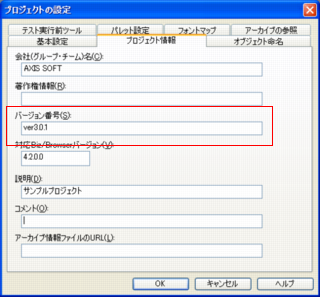
If version is specified, if there is already a cached CAR file on the local computer, it will be checked against the version number, and if there is a mismatch, the CAR file will be cached and the CAR file will be retrieved and cached. After deleting all related files, download a new one from the location specified by car-file-url.
import behavior
When loading a CAR file, the following behaviors occur:
1. Searches if the URL specified for import is already loaded in memory
As a result of the search, if a CAR file with the same URL is found in memory and version is specified in import , version matching is performed. If the resulting version mismatch, a CRS-405 exception will be thrown and processing will be aborted.
If a CAR file with the same URL is found in memory and the version number is not specified, it will be already loaded and will return without doing anything.
2. Get CAR file image
If the CAR file of the specified URL is not found in the memory, the CAR file is obtained by searching in the following order .
(1) Cache
Searches the URL specified by import from the cache.
(2) Inside another CAR file that is already loaded in memory
If the URL specified by import is analyzed and identified as a URL that points to the inside of another CAR file, the recognized CAR file is searched from the memory and the CAR file of the specified URL included is extracted.
For example, in the following case
 import "http://server/lib1.car";
 import "http://server/lib1.car/subdir/lib2.car";
In this example, lib1.car is loaded first, and then import specifies lib2.car in the URL that points to the inside of lib1.car , so lib2.car is searched from inside lib1.car .
(3) External resources such as WEB server If the target CAR file is not found in the above search, it will be downloaded from the specified URL .
If the CAR file specified in the above search cannot be found, an exception indicating the cause will be thrown and the import process will be interrupted.
3. Verification of the acquired CAR file
Verify the header information of the compressed CAR file and confirm that it is a legitimate CAR file. If it is recognized as an invalid file, an exception indicating the cause will be thrown and the import process will be interrupted.
4. Check the version
If the optional version is specified in the import statement, it will be collated with the version information contained in the acquired CAR file.
When the versions do not match as a result of collation, if the CAR file is fetched from the cache, delete all the cache of the CAR file and the file fetched from the CAR file, and “ 2 Get the CAR file image “. It will return to the process and try to re-acquire it from other than the cache.
If the versions of CAR files retrieved from other than the cache do not match, a CRS-406 exception will be thrown and the import operation will be interrupted.
*The version specification function can be used with Ver 4.1.0. or later.
5. Memory expansion of CAR file
The CAR file loaded normally by the above processing is maintained in the memory together with the directory information of the file contained inside. If a file contained in the loaded CAR file is requested in the subsequent processing, the file will be ejected from this memory image.
6. Processing of project
Read the project.xml included in the CAR file and get the project information from which the CAR file was created.
If “Import CRS file” is specified in the project information, the URL is loaded by the same process as the import statement.
Maintaining the integrity of CAR files
CAR files are also cached according to the same rules as NetObject.GET . Also, if the file contained inside the CAR file is loaded by the GET method, it will also be cached. Therefore, the CAR file and its internal files will be cached separately.
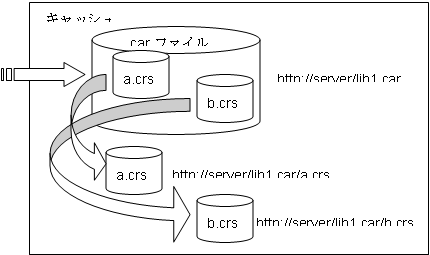
In a sense, CAR files will be cached twice . Also, when a CAR file is loaded, the image is maintained in memory, so there is a CAR file on the server, a CAR file in memory, a cache of CAR files , a cache of files contained in the CAR file, and one CAR . The file will have multiple copies. This suggests that you need to be a little careful to use the CAR fill properly. Consider the following rules to ensure consistency and proper operation of CAR files.
1. There is no way to delete the CAR file loaded in memory .
When managing the version of a CAR file in an application, it is tempting to put a file indicating the version in the CAR file and judge by the value, but such a thing cannot be realized. That ‘s because the CAR file is already loaded in memory when you retrieve the contents of the CAR file. If the version number written in the extracted file is not the expected number, even if you delete the cache of the CAR file, the CAR file is already maintained in the memory, so the new version of the CAR file Will be downloaded the next time you start it.
Bad version control example
import "/lib1.car";
var lib_ver = getHttpSession().Get("/lib1.car/ver.txt");
if (lib_ver.Read() != "3.0") {
    //.DeleteCache("/lib1.car");
    import "/lib1.car";
}
Get("/lib1.car/main.crs");
DeleteCache in this example deletes the cache, but lib1.car loaded in memory remains valid. Main.crs , read by get , is read from a CAR file in memory.
2. Clearing only the cache of files retrieved from the CAR file does not make any sense.
If the CAR file is kept in memory or in the cache, even if you delete the cache of the file retrieved from the CAR file, it will be loaded again from the CAR file in memory or cache . Whenever you delete the cache, you must delete the CAR file cache.
3. When you delete the cache of a CAR file, the cache of the files extracted from that CAR file is also deleted at the same time.
4. When specifying the version in import , all imports of the same CAR file must specify the same version.
It is common to import one CAR file into multiple CRS files . However, in such cases, if the version number specifications do not always match, an exception will occur.
An example of an exception
--- file1.crs ---

import "lib1.car","ver1.0";
    :


--- file2.crs ---

import "lib1.car","ver2.0";
    :
In the above example, the import statement executed later will raise an exception due to a version mismatch.
--- file1.crs ---

import "lib1.car";
    :


--- file2.crs ---

import "lib1.car","ver2.0";
    :
In this example, if file2.crs is executed later, it will only raise an exception if file1.crs loads a different version.
The easiest way to manage the version in the operation using the CAR file is to specify the version of the import statement, but if you are importing with multiple CRS as in the above example, multiple CRS Needs to be maintained and is irrational in another respect.
It is also possible to maintain the CAR file version in the same way as version control for regular CRS files.
Example
----- lib1_version.crs -----
String lib1_version = "2.0.0.1";

----- app.crs -----
String lib1_curVersion = "2.0.0.2";
Get("lib1_version.crs");
if (lib1_curVersion != lib1_version) {
    //.DeleteCache("lib1_version.crs");
    //.DeleteCache("lib1.car");
    Get("lib1_version.crs");
}
import "lib1.car"
With this method, it is important to always keep lib1_version.crs correct as the CAR file is updated . Also, compared to the version specification of the import statement, the description is complicated and more description is required to manage the versions of many CAR files.
It is not possible to decide which method is better, so select the method that suits the characteristics of your application.