4.2 Precautions when starting from a web browser
If you click a hyperlink to a CRS file in a web browser such as Internet Explorer or FireFox, the CRS file will be downloaded by your web browser and passed to you when you start Biz / Browser.
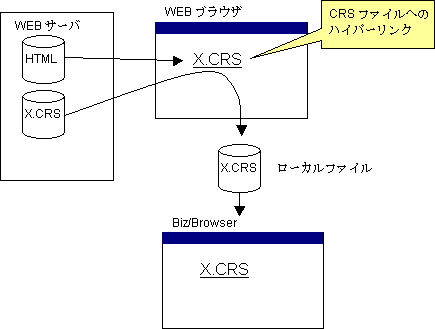
Biz / Browser cannot identify whether the file passed from the web browser is a file downloaded from the server or a file that was originally placed as a local file. As a result, the download destination cannot be specified , and access to the CRS file specified by the relative path cannot be performed correctly.
To avoid this behavior, when launching Biz / Browser from a web browser, you must explicitly tell Biz / Browser where to find the CRS file .
In the CRS file that the web browser downloads first, specify the URL that you should connect to and call the Login method. Biz / Browser will connect to the original URL immediately after loading the CRS passed from the web browser .
--- X.CRS ---
Login (“http://server/app/main.crs”);
Mobile & AI cannot be run inside a browser such as Internet Explorer